HTML Code For Heart Animation

Heart animation is a simple frontend project in which we will use HTML elements to create the structure for our heart and the animation and keyframe concepts of CSS for adding heart animation with I Love You text. Then, using JavaScript, add the continuous animation inside the project.
Before we start with the step by step solution of the project let’s understand some of the basic concepts about the project.
What is CSS Animation?
An animation is a feature of CSS that is used for adding movements inside the element. Using CSS animation, we will change the movement of the element from one position to another. This helps in changing the style and color of the elements to make them visually appealing and engaging.
What is the Basic Syntax for CSS Animation?
/*property-name*/: /*value*/;
| Code by | al-ro |
| Project Download | Link Available below |
| Language used | HTML ,CSS, and JS |
| External link / Dependencies | No |
| Responsive | No |
Html Code For Heart Animation:-
<!DOCTYPE html>
<html lang="en">
<head>
    <meta charset="UTF-8">
    <meta http-equiv="X-UA-Compatible" content="IE=edge">
    <meta name="viewport" content="width=device-width, initial-scale=1.0">
    <title>I Love You animation Using HTML and CSS</title>
    <link rel="stylesheet" href="style.css">
</head>
<body>
 <canvas id="canvas" width="1400" height="600">
</canvas>

<!-- js here -->
    <script src="app.js"></script>
</body>
</html>Now, you can see output without CSS or JavaScript. Then we write CSS for styling the Love animation and use JavaScript for this extreme-level animation project.
Output:-
10+ HTML CSS Projects For Beginners with Source Code
 |
| simple blank output(write css and js for output) |
CSS Code For Heart Animation:-
body {
 background-color: #000;
 margin: 0;
 overflow: hidden;
 background-repeat: no-repeat;
}

JavaScript Code For Heart Animation:-
var canvas = document.getElementById("canvas");

canvas.width = window.innerWidth;
canvas.height = window.innerHeight;

// Initialize the GL context
var gl = canvas.getContext('webgl');
if(!gl){
  console.error("Unable to initialize WebGL.");
}

//Time
var time = 0.0;

//************** Shader sources **************

var vertexSource = `
attribute vec2 position;
void main() {
    gl_Position = vec4(position, 0.0, 1.0);
}
`;

var fragmentSource = `
precision highp float;

uniform float width;
uniform float height;
vec2 resolution = vec2(width, height);

uniform float time;

#define POINT_COUNT 8

vec2 points[POINT_COUNT];
const float speed = -0.5;
const float len = 0.25;
float intensity = 1.3;
float radius = 0.008;

//https://www.shadertoy.com/view/MlKcDD
//Signed distance to a quadratic bezier
float sdBezier(vec2 pos, vec2 A, vec2 B, vec2 C){
    vec2 a = B - A;
    vec2 b = A - 2.0*B + C;
    vec2 c = a * 2.0;
    vec2 d = A - pos;

    float kk = 1.0 / dot(b,b);
    float kx = kk * dot(a,b);
    float ky = kk * (2.0*dot(a,a)+dot(d,b)) / 3.0;
    float kz = kk * dot(d,a);

    float res = 0.0;

    float p = ky - kx*kx;
    float p3 = p*p*p;
    float q = kx*(2.0*kx*kx - 3.0*ky) + kz;
    float h = q*q + 4.0*p3;

    if(h >= 0.0){
        h = sqrt(h);
        vec2 x = (vec2(h, -h) - q) / 2.0;
        vec2 uv = sign(x)*pow(abs(x), vec2(1.0/3.0));
        float t = uv.x + uv.y - kx;
        t = clamp( t, 0.0, 1.0 );

        // 1 root
        vec2 qos = d + (c + b*t)*t;
        res = length(qos);
    }else{
        float z = sqrt(-p);
        float v = acos( q/(p*z*2.0) ) / 3.0;
        float m = cos(v);
        float n = sin(v)*1.732050808;
        vec3 t = vec3(m + m, -n - m, n - m) * z - kx;
        t = clamp( t, 0.0, 1.0 );

        // 3 roots
        vec2 qos = d + (c + b*t.x)*t.x;
        float dis = dot(qos,qos);

        res = dis;

        qos = d + (c + b*t.y)*t.y;
        dis = dot(qos,qos);
        res = min(res,dis);

        qos = d + (c + b*t.z)*t.z;
        dis = dot(qos,qos);
        res = min(res,dis);

        res = sqrt( res );
    }

    return res;
}


//http://mathworld.wolfram.com/HeartCurve.html
vec2 getHeartPosition(float t){
    return vec2(16.0 * sin(t) * sin(t) * sin(t),
                            -(13.0 * cos(t) - 5.0 * cos(2.0*t)
                            - 2.0 * cos(3.0*t) - cos(4.0*t)));
}

//https://www.shadertoy.com/view/3s3GDn
float getGlow(float dist, float radius, float intensity){
    return pow(radius/dist, intensity);
}

float getSegment(float t, vec2 pos, float offset, float scale){
    for(int i = 0; i < POINT_COUNT; i++){
        points[i] = getHeartPosition(offset + float(i)*len + fract(speed * t) * 6.28);
    }

    vec2 c = (points[0] + points[1]) / 2.0;
    vec2 c_prev;
    float dist = 10000.0;

    for(int i = 0; i < POINT_COUNT-1; i++){
        //https://tinyurl.com/y2htbwkm
        c_prev = c;
        c = (points[i] + points[i+1]) / 2.0;
        dist = min(dist, sdBezier(pos, scale * c_prev, scale * points[i], scale * c));
    }
    return max(0.0, dist);
}

void main(){
    vec2 uv = gl_FragCoord.xy/resolution.xy;
    float widthHeightRatio = resolution.x/resolution.y;
    vec2 centre = vec2(0.5, 0.5);
    vec2 pos = centre - uv;
    pos.y /= widthHeightRatio;
    //Shift upwards to centre heart
    pos.y += 0.02;
    float scale = 0.000015 * height;

    float t = time;

    //Get first segment
  float dist = getSegment(t, pos, 0.0, scale);
  float glow = getGlow(dist, radius, intensity);

  vec3 col = vec3(0.0);

    //White core
  col += 10.0*vec3(smoothstep(0.003, 0.001, dist));
  //Pink glow
  col += glow * vec3(1.0,0.05,0.3);

  //Get second segment
  dist = getSegment(t, pos, 3.4, scale);
  glow = getGlow(dist, radius, intensity);

  //White core
  col += 10.0*vec3(smoothstep(0.003, 0.001, dist));
  //Blue glow
  col += glow * vec3(0.1,0.4,1.0);

    //Tone mapping
    col = 1.0 - exp(-col);

    //Gamma
    col = pow(col, vec3(0.4545));

    //Output to screen
 	gl_FragColor = vec4(col,1.0);
}
`;

//************** Utility functions **************

window.addEventListener('resize', onWindowResize, false);

function onWindowResize(){
  canvas.width  = window.innerWidth;
  canvas.height = window.innerHeight;
    gl.viewport(0, 0, canvas.width, canvas.height);
  gl.uniform1f(widthHandle, window.innerWidth);
  gl.uniform1f(heightHandle, window.innerHeight);
}


//Compile shader and combine with source
function compileShader(shaderSource, shaderType){
  var shader = gl.createShader(shaderType);
  gl.shaderSource(shader, shaderSource);
  gl.compileShader(shader);
  if(!gl.getShaderParameter(shader, gl.COMPILE_STATUS)){
  	throw "Shader compile failed with: " + gl.getShaderInfoLog(shader);
  }
  return shader;
}

//From https://codepen.io/jlfwong/pen/GqmroZ
//Utility to complain loudly if we fail to find the attribute/uniform
function getAttribLocation(program, name) {
  var attributeLocation = gl.getAttribLocation(program, name);
  if (attributeLocation === -1) {
  	throw 'Cannot find attribute ' + name + '.';
  }
  return attributeLocation;
}

function getUniformLocation(program, name) {
  var attributeLocation = gl.getUniformLocation(program, name);
  if (attributeLocation === -1) {
  	throw 'Cannot find uniform ' + name + '.';
  }
  return attributeLocation;
}

//************** Create shaders **************

//Create vertex and fragment shaders
var vertexShader = compileShader(vertexSource, gl.VERTEX_SHADER);
var fragmentShader = compileShader(fragmentSource, gl.FRAGMENT_SHADER);

//Create shader programs
var program = gl.createProgram();
gl.attachShader(program, vertexShader);
gl.attachShader(program, fragmentShader);
gl.linkProgram(program);

gl.useProgram(program);

//Set up rectangle covering entire canvas
var vertexData = new Float32Array([
  -1.0,  1.0, 	// top left
  -1.0, -1.0, 	// bottom left
   1.0,  1.0, 	// top right
   1.0, -1.0, 	// bottom right
]);

//Create vertex buffer
var vertexDataBuffer = gl.createBuffer();
gl.bindBuffer(gl.ARRAY_BUFFER, vertexDataBuffer);
gl.bufferData(gl.ARRAY_BUFFER, vertexData, gl.STATIC_DRAW);

// Layout of our data in the vertex buffer
var positionHandle = getAttribLocation(program, 'position');

gl.enableVertexAttribArray(positionHandle);
gl.vertexAttribPointer(positionHandle,
  2, 				// position is a vec2 (2 values per component)
  gl.FLOAT, // each component is a float
  false, 		// don't normalize values
  2 * 4, 		// two 4 byte float components per vertex (32 bit float is 4 bytes)
  0 				// how many bytes inside the buffer to start from
  );

//Set uniform handle
var timeHandle = getUniformLocation(program, 'time');
var widthHandle = getUniformLocation(program, 'width');
var heightHandle = getUniformLocation(program, 'height');

gl.uniform1f(widthHandle, window.innerWidth);
gl.uniform1f(heightHandle, window.innerHeight);

var lastFrame = Date.now();
var thisFrame;

function draw(){

  //Update time
    thisFrame = Date.now();
  time += (thisFrame - lastFrame)/1000;
    lastFrame = thisFrame;

    //Send uniforms to program
  gl.uniform1f(timeHandle, time);
  //Draw a triangle strip connecting vertices 0-4
  gl.drawArrays(gl.TRIANGLE_STRIP, 0, 4);

  requestAnimationFrame(draw);
}

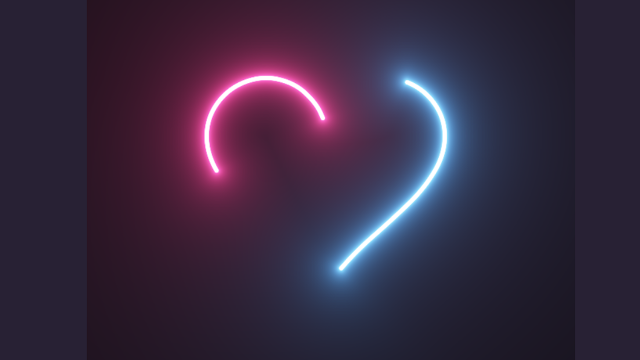
draw();Final Output Of I Love You Using HTML and CSS Code:-


final output of the I Love You Heart animation:
Which code editor do you use for this I Love You Heart Animation coding?
I personally recommend using VS Code Studio, it’s straightforward and easy to use.
What is CSS Animation?
An animation is a feature of CSS that is used for adding movements inside the element. Using CSS animation, we will change the movement of the element from one position to another. This helps in changing the style and color of the elements to make them visually appealing and engaging.
What is the Basic Syntax for CSS Animation?
/*property-name*/: /*value*/;